Category: tanium tale

  • Chuco Team Profile & Perspective – Megan Landers on the Trail to Tanium Success

    Chuco Team Profile & Perspective – Megan Landers on the Trail to Tanium Success

    Can you tell us about your professional history and Tanium story?

    I have been working in the world of Tanium for eight years now. I started my technical career over 20 years ago in desktop support, and moved up the ranks to security operations.

    How did that path lead you to Tanium?

    My first experience with Tanium was as a security engineer for a very large company in the travel industry. The company already had Tanium in place, although this was way before Tanium Threat Response was available.

    I just remember the light bulbs going off when I first saw Tanium in action, seeing that it could give an accurate inventory of all the software in our environment. I couldn’t wait to find out more: How could I use it with the other security tools I was managing? What could Tanium allow us to see, which other tools couldn’t?

    I eventually joined Tanium as an employee because I could see the power of the tool and wanted to learn all the best practices for using it in a corporate environment. I was hooked.

    I was a director of technical account management at Tanium. In that role, I worked with a wide range of organizations to adopt and get the most of out their investments in the platform. I also learned a lot. When the opportunity arose to join Chuco, I was excited by the chance to take my client involvement one step further – with hands on keyboard, we can help organizations reap the benefits of using Tanium faster.

    Can you share more about your role now as a senior consultant at Chuco?

    I work directly with Chuco clients on a weekly basis, helping them use Tanium to address their security and business objectives.
    One of the best parts of my job is getting to “re-live” time and again, the reaction of new users of Tanium —when the light bulb goes off, and they finally have that “Aha!” moment about what the platform can do for them and their organization.

    Of course, when you first turn on Tanium, it can be a big shock. You suddenly see all the vulnerabilities and risks in your environment. I worked with one client that was shocked to discover it had many Windows servers with 400, and even 600 days of uptime — meaning they had not been rebooted and thus hadn’t been patched to address critical issues.

    Is that an extreme or unusual example?

    No, we often remind CIOs and CISOs that no organization is immune from vulnerabilities. These types of issues are often par for the course.

    Everyone has been using the same endpoint management tools with the same limitations. Every company has critical patches outstanding since 2007. And many organizations are running antivirus and EDR software on desktop environments, that are not installed correctly or maintained poorly. The good news is that now you have Tanium, and this can be dealt with in minutes.

    For IT operations teams, turning on Tanium can be overwhelming at first, because there is so much data available. People who are new to Tanium feel like they’re not sure where to start.

    How does Chuco help?

    Chuco comes in and we help teams prioritize and get to the heart of what they can do with Tanium. We like to go in and pursue a jointly-defined list of “quick wins”. As part of that, we’ll start by assessing their environment and making recommendations for what to focus on first. Often, we help our clients set up dashboards to make it easier for them to track the things they care about most.

    I speak directly to CIOs and CISOs in regular status meetings. And I also work with engineers and IT teams, setting up best practices in Tanium, automating self-heal of other agents, helping them make sense of the data, and giving them context. SecOps teams often say they appreciate how quickly we can go in and help them generate reports that communicate what management needs to know.

    Recently, Chuco launched a new “rapid deployment” service offering. It’s designed to help brand-new Tanium clients get up and running within an accelerated timeframe, so they can achieve results even faster.

    You spoke earlier about education and training, how does that factor into your approach to client service?

    We want to train clients to fish for themselves, or at least to the degree they want to. That often means training the in-house team on how to ask the right questions on the Tanium platform.

    An example of this is going over what to do when notified of a critical zero day exploit. That includes using available resources like Tanium Community, learning how to find the sensors that you need, and filtering for what you care about.

    When you’re dealing with the threat of the day, in the past, your desktop operations team had to go from workstation to workstation to find and mitigate vulnerabilities. With Tanium, you can do it all from one console, in seconds.

    Overall, how would you describe working at Chuco?

    I had always heard great things about Kevin Chu [president]. He has known Tanium since the early days and his passion for helping organizations succeed with Tanium is clear in everything he does. I knew going into this role that this would be a great fit, and it is satisfying to be part of such a committed team.

    Working with Chuco, I get to help our clients hit the ground running with Tanium. Depending on the engagement, I can have my hands on the keyboard in the customer environment from Day One. It makes a world of difference. We don’t have to spend 30 minutes walking through how to set things up.

    I help our clients set up reporting and patching, pointing out outdated software, generating compliance reports, and working with the data to help prove the point. With Tanium, reporting is no longer a time sink. Once our clients start seeing the improvement, once they see outcomes, then they are sold.

    For me, it has been rewarding to help our customers catch up quickly with patch management, and respond to new threats, but also set up the framework to stay ahead of potential vulnerabilities in the future. Tanium is a game changer in endpoint management, and it’s a great feeling to help set up our clients for success.

    Learn More About Chuco Rapid Deployment Services

    If your organization is looking to adopt Tanium’s Converged Endpoint Management (XEM) platform to address critical systems management and security challenges, you’re making a wise investment. But getting the greatest return on that investment requires successfully adopting Tanium at scale, and translating its promised potential into real-world performance.

    Read more here.

  • CDW + Tanium — The Best Prescription for Security Risk & Patching Pain

    CDW + Tanium — The Best Prescription for Security Risk & Patching Pain

    A non-profit medical provider with over 72,000 employees globally, offering services including clinical and hospital care, research and education, had a serious IT ailment.

    The head of its workstation team knew that security vulnerabilities lurked across their 90,000 endpoints, distributed over nearly 250 international locations. But with only limited and anecdotal evidence — and no ability to thoroughly examine its environment or effectively patch and update ailing systems — the prognosis for maintaining long term health was dim.

    And that meant, absent intervention, the organization faced continued uncertainty and very real security risk — a question of when, not if, a major breach would occur.

    The workstation team knew that in order to secure the buy-in, budget and resources necessary to address both the symptoms and the underlying causes at scale, it had to address two related needs:

    • First, it needed detailed visibility of the scope and severity of the issues — granular understanding of the state of the operating system and software landscape across all internal endpoints.

    • Building on that capability and knowledge, it also needed modern tools that would empower them to prioritize, patch and update that software to fix those critical issues.

    Turning to Tanium — and skipping to the happy end in this story — the IT team found a single solution that could fully address these needs. Working with Chuco, the IT team has enhanced the organization’s risk assessment and patching practices, putting the organization’s security profile on much healthier footing for the long term. As we’ll discuss in greater detail below, while an initial assessment revealed over 46 million vulnerabilities, that number was reduced by 70% within six months, with priority issues reduced by 90% in that timeframe.

    The CDW Connection — A Tanium Trial Builds Trust in the Technology

    While the organization had an existing patching software in place — a tool from a large vendor offering dozens of products addressing broad IT categories — that utility was not able to deliver results in practice.

    For one, their existing tool provided limited visibility across systems and configuration details — in practice, these were significant blind spots preventing an informed response. Moreover, using the tool to automate patching was painful and impractical.

    So the IT team turned to CDW, its primary supplier of hardware, software and professional services. And in turn, CDW identified Tanium as the better option. Tanium’s fresh vision of converged endpoint management, combined with practical, integrated tools designed to deliver real-world results offer incredible potential.

    To test that in practice, the organization worked with CDW to secure Tanium software for a trial deployment. Through that proof of concept, the in-house team found it straightforward to validate Tanium’s ability to address its patch management challenges effectively in a real-world environment.

    The team also decided to get help from seasoned experts, rather than spend time and resources re-inventing the wheel. So it asked CDW to introduce a consulting partner with the understanding, experience and ability to execute — and CDW brought Chuco into the mix.

    Chuco Changes the Tanium Game

    Through our relationships with both CDW and Tanium, Chuco is able to quickly deliver success at scale.

    Engaging with this new client, our team first worked to understand its environment and objectives, and then extend and operationalize its Tanium trial infrastructure. The project included addressing configuration challenges, implementing best practices, and scaling tools across the organization.

    As part of those efforts, we worked closely with the IT workstation team to answer questions, train and educate. We welcome the opportunity to teach and enable individuals to develop their Tanium proficiency, so they can get more out of the system.

    From a Challenging Risk Landscape, to Chuco Intervention, to Choice Outcomes

    Working to extend the deployment and adoption of 11 Tanium modules, Chuco quickly enabled broad visibility across a number of endpoint security issues. Tanium Comply comprehensively surfaced vulnerabilities, allowing the team to prioritize response measures.

    For example, the PDF software and Java versions in place on many systems was out of date and in need of urgent updates.

    Results were achieved rapidly. Using Tanium Deploy, the team could apply patches easily, and then observe those vulnerabilities fall off of subsequent daily system scans. Seeing immediate results gave the client instant comfort, and the ability to point to early success with management.

    In some instances, the Chuco worked to map Tanium’s patch capabilities to software products not already part of the platform’s gallery of 100+ supported products.

    All told, the initial assessment revealed over 46 million vulnerabilities. Executing to plan over about six months, that aggregate number was slashed by 70% to 8 million. And the most urgent, prioritized issues, like Java updates — which represented nearly half of all flagged vulnerabilities — were cut even further, by 90%.

    [For more detail on how Chuco approaches patch management with Tanium, including an in-depth client case study, see: https://chuco.com/tanium-tale-navigating-a-path-to-more-perfect-patch-management/]

    Scaling Success, Working on Windows

    Another area where Tanium quickly shined was addressing Windows 10 updates and upgrades. Again, the client’s third-party software was unable to perform. But with Tanium in place, we were able to distribute Windows releases to necessary endpoints, reconcile local version and update requirements, and launch the update process with great efficiency and ease.

    To streamline this workflow and avoid internal disruptions, we set up a user notification and confirmation process — so no one was surprised, particularly in those instances where these updates can take some time and/or require a workstation reboot.

    As expected, we encountered instances where legacy applications running on systems prevented updates from succeeding. Tanium flagged those occasional edge cases, enabling our team to identify the cause and remediate those issues.

    The net result of our joint Windows work is that the client’s operating system infrastructure is now far more up to date and secure as well.

    [For more on Chuco’s approaches, lessons and best practices for upgrading and updating Windows 10, including an in-depth client case study, see: https://chuco.com/tanium-tale-welcoming-more-efficient-windows-upgrades-and-patching/]

    Tanium Success Summarized — Achieving New Levels of IT Health, Efficiency and Possibility

    The tailored consulting and training from Chuco has enabled this organization to meet and exceed its objectives. With the system hygiene and security posture of the organization now on much more solid footing, the workstation team is now managing day-to-day use of Tanium internally.

    Having achieved measurable results and significant impact, the workstation team can point to clear ROI when explaining its progress to management (and advocating for continued investment in its critical endpoint management activities).

    Continuing our collaboration, the Chuco team is turning to implement more Tanium capabilities to address new security objectives with the team.

    Finally, seeing the success achieved by the workstation group, this organization’s server team is now adopting Tanium as well. Chuco is providing the server team with advice, guidance, best practices and troubleshooting support.

    In summary, because CDW understood the client’s key challenges and objectives, it was able to connect the client with the right technology (Tanium) and the right consulting partner (Chuco) that has put it on a path for long term IT health, security and success.

    To Learn More

    Whether you’re a CDW customer, just starting to evaluate Tanium, or looking to take an existing Tanium investment to the next level, we would love to connect. With years of hands-on experience, our team of Tanium veteran experts has developed a deep understanding of the platform, unique perspectives, and unrivaled capabilities.

    Whether you’re looking for seasoned advice, help in executing a specific project, or having us join as a virtual member of your internal Tanium team with our managed services model, our team is 100% focused on enabling clients to get the most from their Tanium investments.

    To learn more, feel free to contact us.

  • Better Together — Driving Even Greater ROI from ServiceNow with Tanium

    Better Together — Driving Even Greater ROI from ServiceNow with Tanium

    One of the questions we hear all the time from Chuco clients is, “Can you help us with integration between ServiceNow and Tanium?”

    The benefits of integrating ServiceNow with Tanium are so clear, we can’t think of a reason you wouldn’t want to do it. Relying on siloed data sources increases the risk of inaccurate inventories, visibility gaps, and delays in response times.

    Through integration, workflows created in ServiceNow can access accurate, real-time endpoint data from Tanium — regardless of whether the endpoints are physical, virtual, cloud-based, or in the IoT. Better information means more efficient and more effective automation.

    So if you’re asking whether Chuco can help make
    this integration a reality in a way that works within a specific timeline and budget, the answer is a
    resounding “Yes, absolutely!”

    We’ll share an example of how we worked with a Chuco client in improving their ROI from ServiceNow by using Tanium as a unified platform for IT security and operations. We’ll also discuss several use cases for integrating Tanium with ServiceNow.

    There are several compelling use cases including:

    • Enhancing your configuration management database (CMDB) in ServiceNow through real-time updates from Tanium
    • Optimizing IT and software asset management
    • Further streamlining and automating patch management and compliance
    • Implementing security orchestration, automation and response (SOAR)

    Self-Service Patching

    In a recent client engagement, we worked with a large multinational company that was using legacy tools for patching server operating systems.

    Replacing its legacy patching tools with Tanium, and integrating with the ServiceNow CMDB, allowed the organization to automate patch scheduling across all servers.

    The integration also allowed the IT organization to standardize patch schedule options across the enterprise, automatically enroll new servers into default schedules, and enable authorized users to manage their own patch schedules as needed.

    Server owners are now able to manage their own patching configurations. The “self-service” model means that they can easily choose the relevant servers, as well as when and where to patch them. Once their requests are saved, the workflow automatically updates tables in ServiceNow and makes bulk updates directly into Tanium.

    Admins no longer have to move data back and forth. Where admins had to handle thousands of requests previously, they now only have to deal with approximately 20 requests for the same amount of data.

    The validation system tracks all requests and detects when Tanium and ServiceNow are in sync, and flags instances where they are not. The system can also be configured to trigger a custom reboot process, which notifies users at specified intervals.

    The system can also be configured so that only servers with the correct tags are patched. Every machine can have a tag and can be more than one-dimensional. For example, in addition to their status (production, QA, test, etc.), they can be grouped by location within separate columns (building, room, city/state, zip code).

    Other User Cases

    Another use case clients often ask about is security incident creation.

    When the Tanium Endpoint Security platform is integrated with the ServiceNow Security Incident Response (SIR) product, SecOps analysts can run queries about their assets in the Tanium console based on security event information found in SIR.

    After your environment is scanned and potential cyber threats and compromises are identified, a security incident is created, already populated with the enriched configuration item (CI) data that has been gathered. These processes can be triggered automatically, based on profiles you have created in the Now Platform instance containing Tanium capabilities. The net result is an efficient and effective strategy for endpoint detection and response (EDR) and protecting your assets.

    Looking beyond the CMDB, which pulls technical information about each machine, integration between Tanium and ServiceNow Asset Management allows you to consolidate financial information about licenses and warranties for every endpoint in your global IT estate.

    Next Steps

    Here are additional links to Tanium content on ServiceNow integration, including a recent case study with Honeywell which Chuco also contributed to.

    As discussed, there are many opportunities to get more out of ServiceNow and Tanium through integration. We’re happy to share other use cases, and are also happy to talk through various strategies for which aspects make sense to prioritize for your particular IT and business environment.

  • CISA Releases “Top Exploit” List — How Tanium Can Tame Your Exposure

    CISA Releases “Top Exploit” List — How Tanium Can Tame Your Exposure

    Fresh off the virtual press, the Cybersecurity and Infrastructure Security Agency (CISA) has just published its annual list of the most commonly exploited vulnerabilities for 2021. The report found that in 2021, malicious cyber actors heavily targeted internet-facing systems, such as email servers and virtual private network (VPN) servers, with exploits of newly disclosed vulnerabilities like Log4Shell.

    Three of the top 15 exploited vulnerabilities were also routinely exploited in 2020 and demonstrates the continued risk to organizations that fail to patch software in a timely manner or are using software that is no longer supported by a vendor. 

    The list comprises Common Vulnerabilities and Exposures (CVEs) that are seen actively and frequently exploited in the real world. So for security professionals, if anything should keep you up at night — issues to investigate, check, correct, and then double-check — these should top the list.

    Given the high-profile nature of how the CISA report shines a spotlight on these particular attack vectors, time is increasingly of the essence for any organization to get on top of their security housekeeping.

    CISA noted that patch management is critical. The abrupt shift to remote and distributed working environments driven by the COVID-19 pandemic is now causing new strain on organizations patching procedures, effectiveness, and compliance levels. As the world re-orients into hybrid working models, organizations that invest in the right risk strategies will be positioned to address not only the fresh CISA exploit list, but also the ongoing (never ending) security hygiene challenges they face.

    Having worked with many clients to address a broad ranges of security issues, I wanted to share some thoughts, advice, and practical steps to manage your endpoints using Tanium, a leader in converged endpoint management.

    Through a Scanner, Darkly

    You may have heard the parable about the person hunting for their dropped keys in a dark parking lot at night. A good Samaritan walks up to offer help, but first asks the person why they’re only looking under the streetlamp. The reply: “Because that’s where the light is.”

    The point is you need the ability to search everywhere in your environment where vulnerabilities may lurk, not just the places where you “can” search. You need to be able to shine the light everywhere. (And the other point I’d note, that good Samaritans stand ready to help you.)

    Translating that to practice effect means increasing visibility across your environment so you can look for exploitable CVEs, reduce your attack surface, and generally mitigate the known (and potentially unknown) risks you face.

    And that means implementing a vulnerability risk management strategy for your endpoints.  For greatest practical impact, that strategy should include an integrated approach including the right defined processes, designated personnel, and suitable technology to be effective. This is one area Chuco often advises and works with clients to address.

    A well-prepared and systematic approach enables organizations to not only address the issues of today, but also build the understanding and capacity to address future issues on the horizon with greater efficiency and speed.

    Technology To Light the Way

    When it comes to searching for commonly exploited CVEs, organizations have a variety of available scanning technologies to consider. These include web application security scanners, port scanners, network vulnerability scanners, source code analysis tools, host-based vulnerability scanners, and database security scanners and more.

    This is one of several areas where Tanium shines. It provides a host-based vulnerability scanner for your endpoints that effectively and efficiently find not only software vulnerabilities, but also security configurations worth mitigating. Network based scanners can be blocked or limited in functionality by a firewall or can generate much network traffic.

    Today, as networks and hosts become more secured, system administrators are less willing to let scanning tools remotely access their machines. Furthermore, host-based scanners have direct access to both the file system on a host and its configuration files and running services. Therefore, this may provide a more complete overview of vulnerabilities.

    For Tanium customers that already have the Tanium agent managing their endpoint operations like patching and asset management, it’s relatively straightforward to extend the scope of operations to incorporate the use of the Tanium Comply Module to address these additional security tasks.

    For example, organizations can use Tanium Comply to search for all your CVEs to help you identify, categorize, and prioritized your biggest risks. It provides the capability to conduct continuous vulnerability and compliance assessments against operating systems, applications, and security configuration policies. Searches can be scoped not only by most recent CVE, but also by the most routinely exploited issues noted in the recent CISA update.

    The Power of an Integrated Approach

    As organizations work to make their systematic security measures even more “systematic,” Tanium provides integrated capabilities that will scale your efficiency and success:

    • Tanium Patch and Deploy empowers organizations to seamlessly transition from identifying vulnerabilities, to launching remediation activities such as patching, third party software updates, or policy and configuration changes to remediate those issues
    • Tanium Threat Response enables organization to actively monitor endpoints for suspicious activity and issue event-driven alerts in real time
    • And Tanium’s reporting capabilities allows organizations to aggregate activity, metrics and results — generating “right scoped” summaries suitable for management eyes

    In short, Tanium offers a one-stop, connected security lifecycle management platform, one that can identify vulnerable systems, flag unusual behavior, coordinate patching and other remediation activity, and deliver consolidated reporting suitable for both technical and management audiences.

    A Few Final, Sound Security Sentiments

    While the CISA bulletin puts fresh focus on addressing urgent CVEs, I wanted to end with two prudent security reminders.


    #1 — Look Backwards as Well as Forwards

    While new exploits and alerts warrant urgent attention, it’s important to review older CVEs and assess your environment for any lingering unpatched vulnerabilities. In fact, many of the “most exploited” issues are more than two years old.  It’s prudent to scan and pen test for both the recent trending vulnerabilities and for older vulnerabilities that are no longer at the top of your email inbox.


    Remember, hackers will not limit themselves to using the “latest” exploits. They will take the easiest route, exploiting any open vulnerability of un-patched software and non-compliant systems. If you’re not 100% compliant in patching, it’s worth taking a moment to evaluate your practices and consider improvements. It just takes one vulnerable system to lead to a massive breach.


    #2 — Stay Nimble as People Return to the Office

    In most organizations, the COVID-driven shift to remote working definitely placed new strains on almost every system, person, and process. In particular, during the “100% remote” days of the pandemic, attacks on cloud-based emails, remote desktop applications, and unpatched VPN software became much more prevalent, driving security teams to shift priorities and response measures.


    Remember that as people return to the office, and increasingly work in multiple locations, it’s safe to expect organizations to face greater risks as attack strategies shift and technology teams find it harder to manage the complexity of hybrid networks.   With employees splitting time between the office and off-site location, they’re constantly moving in and out of the company network.  Oftentimes, off-site employees exercise lax security practices. For example, they may use work laptops on public networks where they may get exposed to malware. When they return to the corporate network, they may bring that malware back with them.


    Taking both recommendations together, now is a good time to review CVEs for the common exploits, not just for 2022, but also for much earlier time frames — including exploits that were heavily used before Covid-19.  The last two years, the most common exploits focused on the “100% remote” based vulnerabilities.  As the workforce migrates back to the office, expect new and old “non-remote” exploit types to surface like attacks on unpatched Microsoft and Adobe Flash products. 

     Cybersecurity crimes continue to increase, and it’s vital that organizations are prepared to detect and respond to those security risks.  Enacting a proactive endpoint vulnerability management program that includes the right tools, and experienced professionals to use them, will help mitigate significant risk. 

  • The Log4Shell Threat to Businesses —  Not Out of the Woods Yet

    The Log4Shell Threat to Businesses — Not Out of the Woods Yet

    The FTC means business when it comes to pushing organizations to patch Log4j promptly. On January 4, 2022, the FTC blog issued a reminder that failure to mitigate known software vulnerabilities could result in legal action. The FTC highlighted the $700 million fine issued to Equifax for its failure to patch a known vulnerability – which resulted in exposing the personal information of 147 million consumers – as proof that they are holding businesses accountable for security.

    In addition to the punitive and legal risks faced from the Log4j vulnerability, there is clear evidence that threat actors, including known nation-state actors and cybercrime organizations, have moved quickly to exploit “Log4Shell.” The exploit makes it simple to execute malicious code remotely, and is estimated to affect hundreds of millions of devices. In parallel, enterprises, vendors and cloud services have moved to patch their systems fairly swiftly. But given its pervasiveness, finding every single instance of Log4j in every environment could take years. And every day a vulnerable device goes unpatched is another day that an attacker could compromise a system, install a backdoor, and quietly wait to attack.

    Why Log4Shell is Hard to Find

    Even if you’ve taken the initial steps to patch your systems, the problem is that Log4Shell is not your typical vulnerability. Log4j is not software from a single vendor. The Apache Log4j software library is an open-source building block used widely across millions of web sites and cloud applications you use, adapted in different ways. It’s also used in a range of operational tools, equipment and devices you may never have imagined were running so much code. In some instances, it’s even repackaged, renamed, and/or embedded into the application itself – so deeply buried that it is difficult to find.

    The Tanium Advantage in Surfacing and Remediating Log4Shell

    Finding which assets across your environment need to be updated is challenging. Many endpoint tools can’t scan all your workloads at scale or provide accurate answers about what’s running on your network quickly enough. When it comes to addressing your cyber security challenges, the Tanium platform has an advantage with speed and accuracy, and delivers valuable endpoint visibility and control using a combination of tools:

    • Tanium Reveal enables you to find and review sensitive data by inspecting the contents of user and system files. Quickly search JAR, EAR, WAR, and ZIP files of vulnerable usage of the Log4j library, including those repackaged by third-party vendors.

    • Tanium Threat Response allows you to investigate and hunt for vulnerable jar files by hash, file name, and versions. In addition, you can alert your SOC team of any signs of exploitation by importing the relevant Yara rules, IOCs, and SIGNALs to scan for the malicious Log4j payloads. Then take immediate action to quarantine, download logs, collect evidence or quickly pivot and search for forensic artifacts at scale across your enterprise.

    • Tanium Comply provides executive and actionable reporting and vulnerability assessments of all Common Vulnerabilities and Exposures (CVE)s including the Log4J vulnerability CVE-2021-44228.

    • Tanium Patch and Deploy allows you to quickly remediate at scale and deliver updated versions of software you’ve identified as vulnerable.

    In addition to the tools and technology, the Tanium User Community is where you can engage with industry peers and other security experts to get technical guidance on Tanium products. Contributors from the Tanium community provide insights and updates on major threats and have been a valuable resource for technical details on the Log4Shell vulnerability.

    Adding Chuco Security Services to Your Defenses

    At Chuco, we’ve already been helping many of our clients – from large enterprises to smaller organizations – in finding, patching and remediating Log4j vulnerabilities. Our Tanium Consultants, many of whom have previously worked at Tanium and/or on enterprise SecOps teams, are all Tanium Certified and can help with getting the most out of Tanium to address your needs.

    • Configuration & Planning: From configuring Tanium Reveal and Threat Response to identifying and patching Log4j, we can work with you to take a structured approach to detection and mitigation. Chuco will collaborate with your experts to conduct assessments and determine how well your Tanium environment is performing, then work with you to build and deliver a roadmap to mature and maximize your investment in Tanium.

    • Hands-On Support: When you need “all hands on deck” but can’t afford to take your security analysts off other tasks, we have security experts who can augment your teams, bringing an understanding of business processes together with the “hands-on” technical expertise you need to execute your detection and mitigation plan.

    • Customizations: Through automated features and robust APIs, the Tanium platform is known for its built-in extensibility. We can help you get the most out of Tanium by writing custom scripts, and configure Tanium to integrate with all your other critical enterprise SOC tools to streamline and orchestrate the most effective detection and response solution that fits your organization’s needs.

    • Post-Exploitation Response: Realistically, Log4j is so pervasive that not every device that is using it can be updated or patched, such as IOT devices or outdated appliances. It’s paramount to work with an experienced team who understands the threats and vulnerabilities to your business and can maximize the coverage and capabilities of your security tools. If your organization has been exploited, we can help you leverage the rest of the Tanium security suite to respond at full capacity, including supporting your incident response operations by collecting forensics evidence, quarantining endpoints, and conduct deep dive investigations to tackle serious cybersecurity threats and issues.

    Please get in touch to discuss how Chuco can help you with Log4j mitigation. Our consultants are standing by to help design or extend your response strategy, and put hands on keyboard to help execute.

  • Tanium Threat Response — Optimizing Your Threat Hunting by Prioritizing Your Events

    Tanium Threat Response — Optimizing Your Threat Hunting by Prioritizing Your Events

    Alert fatigue is a well known problem in cybersecurity. Many organizations are flooded with so many security notifications, they are at significant risk of missing actual threats.

    Tanium Threat Response gives organization threat hunting, security operations, and incident response teams the deep visibility to surface valuable security endpoint data and telemetry. Events are generated, providing security teams with various insights into their environment, including risky behavior, suspicious usage, vulnerabilities, misconfigured settings, as well as serious indications of compromise. A client with no previous visibility on enterprise-wide endpoint security data may be overwhelmed with the thousands of new insights they receive from Tanium.

    Recently, Chuco helped a client reduce the volume of security events they were receiving from Tanium Threat Response. The client, a large business unit within one of the world’s largest multinational corporations, had been receiving over 10,000 event alerts a day.

    The good news is that you can tune your security events to dial down the “noise” and make it easier to identify relevant threats. We helped our client reduce the number of events to between 10 and 50 a day by filtering out benign behaviors and low priority items.

    A Multi-Phase Iterative Approach

    How did we do it? We followed a multi-phase iterative method to test and tune the types of alerts the client was receiving from Tanium.

    The Tanium Event Recorder collects very valuable data – every process, every file change, and every modification on the system is captured. Tanium Signals then applies intelligence to let you know when anomalies happen, so you can investigate for possible attacks, breaches, misconfigurations and other vulnerabilities. The challenge for IT and security teams is to prepare so that they aren’t immediately overwhelmed by the alerts that are generated.

    Creating a test environment to confirm that the intelligence is useful is the best way to start. It gives you a chance to identify any benign behavior in your environment that may initially trigger false positives. For example, there may be actions your sysadmins perform periodically which should be filtered out.

    Many clients have asked whether AI and machine learning can be used to separate the signals from the noise. While much progress has been made in applying machine learning to identify potential security threats, AI is only as smart as people teach it to be. So for trying to prevent novel sophisticated attacks, if the AI isn’t learning the right algorithms, it could end up making your defenses weaker. By and large, it still makes sense to adopt new security innovations like AI, but you also need to have the human touch from experienced professionals to ensure AI isn’t causing security problems instead of solving them.

    A Typical Engagement

    In a typical Chuco engagement, we work with clients to understand their business risk profile and evaluate the alerts they are receiving in the test environment to sort the low priority or benign activity from the high priority and potentially malicious. As consultants, we familiarize ourselves with your unique security environment and ask questions so we understand what’s “normal” and what’s not. We get to know approved host names, approved software, and the typical schedule of machines in your system. We also get to know the approved users, and how User A in your network behaves versus User B.

    Once an assessment has been made of each alert, we take one of several actions: set labels, suppress the alert, remove it entirely, modify and tune it, or promote the alert to the next phase of testing.

    After that, it’s a case of rinsing and repeating through another phase. Once you’re confident that the alerts and events you’re receiving are identifying issues that require further investigation, you’re ready to push out the configurations system-wide in a production environment.

    Prioritizing Alert and Event Types

    Of course, it’s helpful if your CISO and/or the security ops or threat response team is able to define up front what types of activities they want to receive alerts on, such as suspicious behaviors, specific campaigns of malware, or a specific compromise called to their attention by the FBI. Or, they may ask for general alerts on anything related to crypto mining or exfiltration of data.

    In some cases, we also have had clients who are mainly looking for HIPAA or SOC2 compliance alerts, so that they can fulfill their compliance obligations.

    At Chuco, we can work with you to create and update customized alerts based on new attacks being reported in the wild, or based on company policy and/or priorities, as well as import known indicators of compromise.

    People, Processes and Technology

    Regardless of your priorities, it’s essential to have processes in place to ensure that each type of alert is assigned to an analyst or other individual whose role it is to investigate and take mitigating steps as needed. We’ve supported smaller organizations where each team member is wearing multiple hats – as well as larger organizations with dedicated teams focusing on threat hunting, alerts and policy, plus engineering and devops teams who contribute to security operations. Chuco experts can work with you to define roles and establish processes, and offer additional support around Tanium if needed.

    The advantage of getting your Tanium security alerts under control is that you can make the most of Tanium Threat Response and quickly identify potential attacks, vulnerabilities and malicious insider behavior. Furthermore, it makes your team more efficient – so that they’re not burdened with having to manually sort through an inbox full of false positives.

    Configuring Tanium Threat Response and keeping on top of updates can require a significant investment of time and attention to detail. Contact Chuco if you need help with tuning and maintaining your security alerts – taking into account the people, process and technology considerations particular to your environment.

  • Tanium Tale — A Simpler Way to Execute Tasks in Tanium
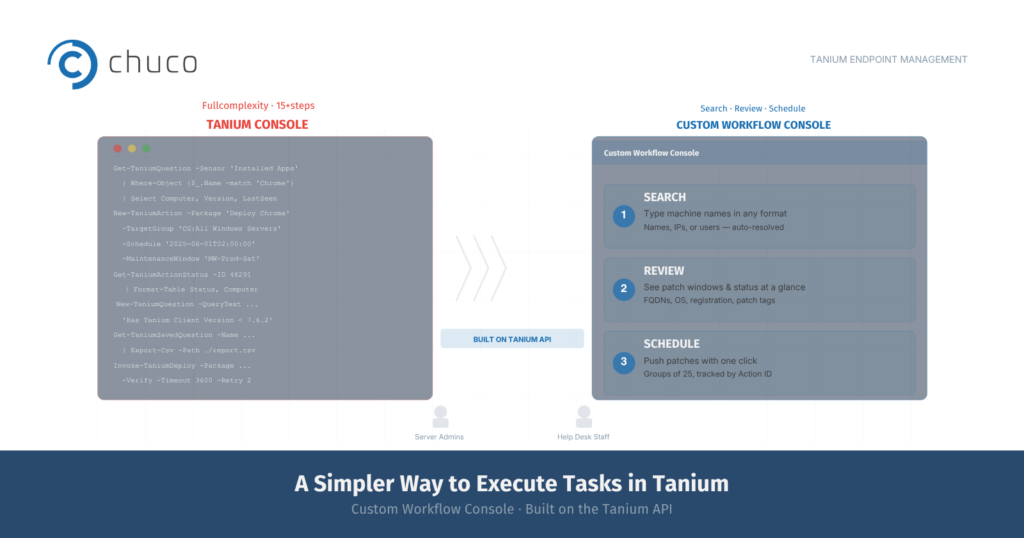
    Tanium Tale — A Simpler Way to Execute Tasks in Tanium

    When it comes to seeing and controlling every endpoint across your network, there simply is no platform that can compare to Tanium.

    However, in our extensive work with a diverse set of clients, we’ve found that some users really want a faster way to execute specific tasks – without having to navigate the Tanium console.

    The first class of users – Windows administrators and Linux administrators – is highly technical. These users are often accustomed to getting most of their work done using a shell. With so many other day-to-day responsibilities, these Linux and Windows administrators often ask if they can access Tanium via a simpler console interface in order to patch and secure their systems quickly and efficiently.

    Another class of users is help desk support staff. Depending on how IT support staff are organized, the Tier 1 and Tier 2 help desk may need to deploy software updates targeting specific machines using Tanium. In reality, they require only limited access to Tanium and want to avoid deploying packages to the wrong machines or perform other actions by mistake.

    In order to get maximum benefit out of endpoint security management using Tanium, clients have asked us to develop a tool with a web console to enable these users to perform basic tasks without becoming a fully certified Tanium operator.

    The Custom Workflow Console for Tanium

    In response, we’ve developed a simple tool for basic users of Tanium, based on the Tanium API. The Custom Workflow Console is a web app for Tanium that provides a simple way to run queries and schedule patches, and doesn’t require knowledge of how to use Tanium Question Builder.

    For experienced admins, it can provide a much faster way to find servers and workstations with the attributes they are looking for; identify potential maintenance windows; and plan and schedule patches.

    For help desk staff, it can provide a “safer” way to deploy patches targeting specific machines. They no longer have to worry about forgetting a step and accidentally deploying patches to a much larger number of computers than they had intended.

    Use Case #1 – Custodian of 40 Servers

    Here is an example of how the Custom Workflow Console works. Say you are the custodian of 40 servers out of thousands in your organization’s network. You’ll regularly check on the status of those servers: when are they scheduled to get patched; are they even ready to get patched; and whether there are any servers that did not get patched, or were only partially patched during the last scheduled update.

    Using the Custom Workflow Console for Tanium, your admins can type in machine names in any unstructured format to search for the specific servers they are looking for. They can also type in IP addresses, or last logged-in user or a combination of computer names and IP addresses and last logged-in user. This saves time spent hunting for the “correct” server name and format in order to find them in the system. (The parser automatically runs reverse look-ups in the background, and also de-duplicates as needed.)

    The Query Patch Window page then automatically displays the FQDNs, the IP addresses, the patch window tags, operating systems, the registered time, and how many minutes have passed since the last registration for each of the servers.

    The Update Patch Window page allows you to schedule patches with the push of a button. Groups of up to 25 machines can be upgraded at once, and are assigned the same Action ID. Later, when you check on the status of your 40 servers, you can quickly run reports on the relevant Action IDs to find out if any additional follow up is needed.

    Use Case #2 – Help Desk Support Staff

    If you are a Tier 1 or Tier 2 help desk support specialist, you generally provide very focused support to end users. The Custom Workflow Console enables you to quickly find the status of the computers you are looking for, even without extensive training on the intricacies of Tanium Question Builder and all the additional functionality and access you don’t need.

    The web app also provides safeguards to prevent you from accidentally patching more machines than you had intended. By reducing the time it takes to find the right workstations and streamlining the package deployment process, you’ll be faster in responding to help desk tickets and in contributing to your organization’s endpoint security.

    To Learn More

    The Custom Workflow Console for Tanium is just one tool we provide to simplify and automate endpoint security for our clients. At Chuco, we are all Tanium all the time and offer our clients the flexibility to engage our team at the level of involvement and cost that suits their needs.

    For more information about Chuco – including the Custom Workflow Console and/or the managed services options we offer to clients who prefer more hands-on support on an ongoing basis – please contact us.

  • Tanium Tale — Welcoming More Efficient Windows Upgrades and Patching

    Tanium Tale — Welcoming More Efficient Windows Upgrades and Patching

    When a global $13b business protecting the most critical information assets of thousands of customers sought to take greater control over its Windows workstation environment for 13,000 employees, it turned to Tanium.

    When Tanium sought to engage the best partner to enable its customer’s long-term success with the platform, it tapped Chuco. We’ll take a closer look at some of the highlights of that collaboration over the past year.

    Slipping Through the Closing Window on Microsoft Windows 7

    After standing up Tanium Server and key modules (Patch, Deploy, Discover and Asset), Chuco had rolled out clients across the organization’s server (6,500 Windows and 3,500 Linux) and workstation infrastructure.

    Chuco then turned to address one of this business’s most critical challenges — efficiently upgrading upwards of 8,000 workstations from Windows 7 to Windows 10.

    With support ended in early 2020, and Microsoft only offering limited security updates through a costly Extended Security Update (ESU) program, continued use of Windows 7 presented intolerable levels of risk and expense. In addition to the cost of support and the security exposure presented by continued use of Windows 7, there was also considerable risk in managing the dependencies of specialized applications running on those systems, as those tools halted their own support for that retired operating system.

    This dynamic created uncertainty, pain and inefficiency for the IT teams responsible for supporting an increasingly complex technical landscape, as well as the end users relying on critical applications running on out-of-date Windows 7.

    However, updating thousands of machines to Windows 10 posed its own set of serious risks and potential costs. The project could not be undertaken lightly.

    Many “Panes” Make for Greater Risk and More Pain

    A massive upgrade process in this scenario is complex. Even basic steps like distributing operating system update files (e.g. ISO images) and managing the bandwidth to distribute them present significant challenges. In this case, the organization had a global presence, including offices situated in remote locations with multiple machines served by tightly limited bandwidth.

    That global footprint presented a number of cascading constraints. When configuring upgrades, managing languages, language packs and associated dependencies can be overwhelming. Consider that locations have systems with the “expected” localized version of Windows for that geography. Now consider scenarios in which users further customize their own machines — or shared accounts on the same machines — with language packs that are not standard to that geography.

    For example, one would expect Canadian users to expect an integrated option for French in Windows 10. And Microsoft does just this in its OS configuration. What’s less expected is a scenario in which an individual who prefers to work in French Windows is based geographically in China and installs a one-off language pack to parlez-vous français on their particular workstation. Or, making things even more interesting, on a workstation shared by several accounts and individuals.

    This scenario represents just one “known unknown” in terms of system configuration details that have to be mapped, identified and accounted for in any upgrade plan.

    “This scenario represents just one “known unknown” in terms of system configuration details that have to be mapped, identified and accounted for in any upgrade plan.”

    Application and OS Complexity Compounds the Challenge

    The same principle applies at the application layer. In this client’s environment, machines often supported mission-critical applications – such as scanning software vital to information management — that would not work on Windows 10 “as is.” Either those were out-of-support legacy tools themselves, or they would require additional upgrades to work on a more modern operating system. Again, this required another map of potential pitfalls to develop and plan for as part of an upgrade program.

    Adding a further twist, one of the applications this client used on many machines was a third-party disk encryption solution. The net implication for those systems would be that absent an automation solution, someone would have to physically enter decryption keys any time the system was rebooted. And reboots tend to be part of any Windows OS update activity…

    All taken together, facing a plethora of problems to navigate, one can see why it would make sense to maintain a Windows 7 status quo as long as possible. If everything went right in the transition, without absolutely no surprises or disruptions, the net change in experience for end users would be the status quo (with a new UI to get used to).

    But by engaging Chuco and taking advantage of our extensive experience executing complex Tanium projects, this organization was able to set sights on and reach a new vista swiftly and smoothly.

    “All taken together, facing a plethora of problems to navigate, one can see why it would make sense to maintain a Windows 7 status quo as long as possible. If everything went right in the transition, without absolutely no surprises or disruptions, the net change in experience for end users would be the status quo (with a new UI to get used to).”

    Updating Windows, Working in Waves, Learning Lessons, and Scaling

    Given the complexity of this client’s environment, Chuco took full advantage of the broad range of tools and capabilities Tanium provides, adding our own innovations and enhancements along the way.

    Core to our success was establishing comprehensive visibility across workstations and their configurations, and working iteratively in waves to group and update those systems. Tanium gave us the power to effectively use available bandwidth for ISO distribution, and to configure upgrades mapped to the OS-level language and add-on language pack requirements of each system. The same held true for application-level updates that these system upgrades necessitated, though sometimes with some system-level manual intervention.

    By grouping systems, we were able to check our work, resolve any issues, learn some technical lessons, and make some exciting discoveries along the way to accelerate our progress.

    Depending on the nature of the systems and the updates at hand, Chuco would work with the client to update as many as 1,000 systems at a time. Because of the significant shift from Windows 7 to Windows 10, we took care to communicate clearly with end users. That included multiple email notifications that included escalation paths for them to raise issues or ask questions. We also took advantage of Tanium’s ability to present users with a system-level “pop-up” and ability to defer their scheduled upgrade for two days.

    As we brought more systems live on Windows 10, we also worked with the client to push Windows 10 updates as well, as those became available (e.g. version 1909, version 2004, version 21H1). In many instances, these updates could be executed in a way that was completely transparent to end users.

    As expected, this scale of project wasn’t “push button” — but it was one we were able to plan and execute within the client’s time and on budget constraints.

    “All taken together, facing a plethora of problems to navigate, one can see why it would make sense to maintain a Windows 7 status quo as long as possible. 


    “If everything went right in the transition, without absolutely no surprises or disruptions, the net change in experience for end users would be the status quo (with a new UI to get used to).”

    Results, ROI and Lessons Learned

    • Expect Technical Challenges (and Expect to Overcome Them). In an exercise of this scope and scale, scenarios requiring a bit of troubleshooting are going to be a given. One interesting obstacle we encountered we the client’s use of third-party full disk encryption (McAfee). Thankfully, we were able to configure our process to bypass that temporarily without requiring intervention from the user upon reboot. Similarly, navigating some system-level driver requirements posed the occasional challenge.

    • Early and Continued Visibility Brings Victory. The best problems to solve are the ones that don’t pop up as unexpected, time sensitive surprises. When executing a large scale patch and update initiative, it’s critical to assess your environment to identify as many of these issues ahead of time. Thankfully, Tanium makes gaining this level of comprehensive visibility possible. The corollary here is “don’t get cocky” — defining a reporting, remediation and response plan for dealing with the unexpected you encounter along the way — before your you push the first update — will serve you well. And help you sleep easier.

    • It Pays to Connect with a Tanium Expert. Tanium provides a solid framework for updating default environments. But no enterprise environment is ever “default.” That’s why connecting with expert consultants, even in an advisory capacity, can deliver significant value. Not only will this help you avoid potential pitfalls as you develop an upgrade methodology specific to your organization and environment, it can also pay surprising dividends.

      For example, in this instance during the planning process we conducted a review of the Microsoft knowledge base, and discovered a game-changing detail in KB4023057. Turns out, Microsoft had bundled files and data for Windows 10 version 21H1 in an earlier update. By building a custom script to activate those already present but dormant files, we were able to bypass the need to push nearly 5 gigabytes of data to each system. Instead, we were able to activate that version update by delivering a customer 1 megabyte update.

      The time and bandwidth savings this discovery delivered were significant. It was a rare example of a true “push button” solution that proved our earlier rule that this never happens — and was cause for great celebration by both the client and the Chuco project team.

    To Learn More

    If you’d like to learn more about how we work with organizations to swiftly and smoothly execute Windows upgrade/update projects with Tanium, we’d love to connect. Our team of seasons, certified Tanium experts has deep, hands-on experience in this domain. We’ve developed an extensive understanding of the product, its capabilities, and best practices for achieving the objectives that matter most to our clients.

    So whether you’re looking to explore projects like implementing Tanium or expanding your use of the product, or you’re looking to engage experts in a more active, managed services model, we have experience, insight, and hands ready to assist.

  • Tanium Tale — Navigating a Path to More Perfect Patch Management

    Tanium Tale — Navigating a Path to More Perfect Patch Management

    When a $30 billion dollar transportation company with 10,000 endpoints and hundreds of servers adopted Tanium, they realized that improving their patching capabilities, efficiency and overall compliance levels could have a significant impact on their ROI. Tanium introduced them to Chuco, and we got moving — fast.

    Getting Ready to Go Fast

    We started first by listening closely and then carefully charting our course. We always want to develop and validate a clear understanding of each client’s specific goals and objectives.

    Of course, everyone wants to achieve “successful outcomes.” But “success” means different things to different people. Making assumptions and skipping validation Is like embarking on a critical journey without an accurate map — a sure way to encounter dead-ends, detours, and even disaster.

    In this case, we identified the client’s top priorities and concerns. These included a pressing need to address server patch management specifically, and a general vision to improve three key areas over time: compliance, “stakeholder sensitive” reporting, and custom notifications.

    Determining a (Managed) Mode of Transport

    When we plan with clients, we jointly explore not only the specific technical and process outcomes we’re setting out to achieve, but also the engagement model best suited to deliver those results.

    In this case, early client discussions made it clear that there was plenty to do in the short term, and a far-reaching runway of opportunity in the long term. That realization was important, as it shaped how the client chose to structure its relationship with Chuco.

    Specifically, rather than hire us for a one-off project, our client saw the value in our managed services approach. We offer several options and the flexibility to engage at a level of sustained involvement suited to diverse needs and budget levels.

    The advantage of a managed services approach is that Chuco engagement, availability, and activity is consistent and dependable:

    • We can place hands on keyboard (or not) practically on demand

    • We are regularly touching, tuning, and tending Tanium

    • We can manage and allocate staffing, so familiar faces are facing the client

    • We develop a deeper understanding of the client’s environment, preferences, and even culture — all of which enable more greater productivity and success

    A managed model means we are consistently engaged, evaluating, adjusting, and extending Tanium for the organizations we serve. And in the case of our transportation client, this model really accelerated our pace and progress. Let’s look at three key milestones on that journey.

    • We can place hands on keyboard (or not) practically on demand

    • We are regularly touching, tuning, and tending Tanium

    • We can manage and allocate staffing, so familiar faces are facing the client

    • We develop a deeper understanding of the client’s environment, preferences, and even culture — all of which enable more greater productivity and success

    Destination #1: Patch Plateau

    Before Tanium entered the picture, our client had patch processes in place, but they weren’t able to get them where they really needed to be.

    For one, relying on native Microsoft tools (System Center Configuration Manager / Endpoint Manager) left them unable to address an extensive Linux server landscape. Nearly 400 Red Hat Enterprise Linux servers were 100% non-compliant, most missing over 100 patches.

    With Tanium offering unified command and control over patch management across environments, the trick and challenge is configuring updates to address an organization’s specific needs and constraints.

    In this case, we created a centralized server patch management regime for both Windows and Linux systems, navigating the limits of defined maintenance windows and other dependencies, working with application custodians on the client’s IT team.

    Those constraints include updating dependent servers in the right order.

    Consider a solution comprising multiple application servers, database servers and web servers: To keep production services up and avoid surprises during patch/reboot operations, it’s prudent to patch in a deliberate order, incorporating QA validation along the way, rather than take all application servers offline at the same time.

    Today, our client has achieved its compliance objectives; see Figure 1 for a snapshot of “before and after” server patch levels. And we continue to provide ongoing patch support as part of our managed services engagement — across its hybrid server environment and Microsoft workstations — to keep things on safely and consistently on track.

    Destination #2: Reporting River

    With compliance under closer control, the client wanted greater visibility. And while Tanium provides solid native reporting capabilities, using these requires building multiple queries using the Console, and performing a number of manual steps.

    To meet this organization’s more advanced needs, we developed a custom solution, taking advantage of Tanium API access, to build, run, and deliver tailor-made reports automatically. Most importantly, these are designed to provide the right levels of technical detail, rolled-up summaries, and delivery format best suited to three specific internal audiences:

    • Senior Executives — who want a “bird’s eye” view of key stats, delivered in a PowerPoint-level of abstraction

    • Operational Directors — who want a more “Excel-like” view of system data, including the ability to manipulate and explore that data directly themselves

    • Technical IT Custodians — who want machine-level, granular detail at the push of a button, without having to log into machines or the Tanium Console to build queries and screens or gather data

    As highlighted in Figure 2, our solution offers just this — from executive-level slide summaries, to nitty-gritty details.

    And as part of our managed services support, we are on deck to add, expand, and adapt these summaries as the client’s needs evolve. The net result is they can focus their time on understanding, evaluating, and acting on the insight these reports provide — rather than on building, running and processing them.

    Destination #3: Notification Oasis

    With patching under control and reporting providing operational teams and management with faster and deeper insight into the state of their internal landscape, the client’s third wish was to get key technical updates and progress reports delivered to their inboxes.

    To enable greater efficiency for operational teams, we developed a system that delivers both scheduled and event-driven updates via email.

    Our client wanted to address two key scenarios. The first is pre-patch notifications. These let server custodians know in advance that updates are coming. Think: “In two days, Server A is going to receive these 18 patches and Server B is getting these 23 patches.”

    For our client, this visibility increases awareness, and avoids internal surprises (like updates mistakenly scheduled outside of proper maintenance windows).

    Similarly, this system also sends post-patching email summaries. These are important as they remind server and application owners to address any tasks they need to execute after servers and applications are updated, including validating system integrity and executing any manual changes specific patches may prompt.

    With the average custodian managing 30-50 servers, these automated notifications have been a big hit.

    The ROI, Lessons and the Larger Opportunity

    The key takeaways here are three-fold:

    • Tanium provides a powerful platform for centralizing patch management across diverse environments. But what the story above really highlights is the added value of increased visibility. Without a comprehensive and accurate picture of your patch landscape, you could be driving activity based on false assumptions, facing risks in the road you may not even be aware of. It’s better to identify and resolve those issues on the horizon then encounter unexpected potholes — which Tanium can enable quite effectively.

    • Expanding on Tanium’s native reporting capabilities opens broad new landscapes of possibility. As illustrated by this example, adding new reporting and notifications can really help organizations effectively realize the potential Tanium offers to address the practice IT and management needs their organizations face.

    • It pays to work with a seasoned guide and pathfinder that’s integrated into your internal team and operations. In this instance, taking advantage of a managed services approach enabled our client to accelerate their journey, adjust direction when needed, and continue to build on their Tanium success.

    To Learn More

    If youd like to learn more about how we help companies get the most from their Tanium investments, we would love to connect. With years of hands-on experience, our team of Tanium veteran experts has developed a deep understanding of the platform, unique perspectives, and unrivaled capabilities.

    So whether youre just starting to work with Tanium, or looking to really push things to the next level, we are ready to assist in a way that suits you — whether you’re looking for seasoned advice, help in executing a specific project, or having us join as a virtual member of your internal Tanium team with our managed services model.

  • Tanium Tale — Trading Tripwire Toll for Tanium Treasure

    Tanium Tale — Trading Tripwire Toll for Tanium Treasure

    A healthcare provider serving over 12 million members nationally recently seized a tremendous opportunity to achieve significant cost savings, simplify its IT infrastructure, and reduce internal support costs by replacing Tripwire File Integrity Manager with the equivalent capabilities in Tanium Integrity Monitor.

    Now, this organization already had seen great value from Tanium, which it uses to manage and configure over 500,000 endpoints. But it knew that migrating to a new file integrity solution posed some level of material risk.

    Given the sensitive nature of the compliance requirements driving file integrity management in highly regulated industries, and the complexities of the existing software and configuration parameters in place, this was not a journey without potential challenges and traps.

    I’d like to share the highlights of how Chuco quickly tackled those issues, set our client up for long-term success, and delivered significant budget savings in the process.

    Understanding Scope and Defining Success

    With a Tripwire license renewal deadline approaching, and an opportunity to dramatically reduce that expense with a swap out, this healthcare provider engaged Chuco in late 2020, based on a recommendation from Tanium. The client had an aggressive deadline in mind, and we love a challenge — particularly when we can put our team’s skills to effective use (in this case, literally in the fourth quarter, with the clock ticking).

    While the organization had over 500,000 endpoints, there were 2,500 key systems subject to file integrity management requirements. And they wanted to bring over the specific and exact configuration of the monitoring rules, reports and other key parameters they already had in place.

    In many respects, success looked like the status quo — but with a significant license cost slashed from their budget, and one less software system to administer and wrestle with.

    In many respects, success looked like the status quo — but with a significant license cost slashed from their budget, and one less software system to administer and wrestle with.

    Assessing a Complex Compliance Landscape

    File integrity management plays a critical role in addressing regulatory, compliance and security requirements.

    On relevant systems, monitoring rules define folders and files where operations need to be actively logged (e.g. create, delete, write, rename, change permissions). And reporting rules communicate summaries and alerts to key stakeholders on an event-based or scheduled basis.

    So if the signature of a file changes, particularly outside of a normal upgrade window, someone can actively intervene and execute any security review procedures.

    And in Tripwire, those systems are categorized in a massive tree structure where servers are tagged with relevant criteria labels. Those labels determine the specific rules and reports that may be applicable to any given server. It’s a many-to-many relationship — there are a lot of leaves in this forest and none can be left out.

    Chuco Automates Endpoint Configurations (Without Any Changes)

    To smoothly execute this migration, Chuco developed a set of custom tools to analyze existing Tripwire data and provide the automation necessary for a quick, error-free, and exact import into Tanium.

    Our toolkit addressed several critical stages of the journey. But, fundamentally, we built a solution for parsing the enormous Tripwire dataset describing the system node structure: all the endpoints, configuration details and descriptive tags, and then re-creating the Tanium compatible equivalent data structure for import into Tanium Integrity Monitor.

    By taking the time to solve the hard technical problem, we made the actual migration look easy. Put otherwise, we had collectively agreed that a manual process to do the extract, reconfiguration and loading into Tanium would have taken 4-6 months.

    Our approach — which resulted in the creation of 200 system groups and configurations for all 2,500 endpoints, including different 1000 custom tags — took about 15 minutes. And what’s more, by avoiding a manual process, we eliminated the risk of human error.

    Our approach — which resulted in the creation of 200 system groups and configurations for all 2,500 endpoints, including different 1000 custom tags — took about 15 minutes.

    The ROI, Lessons and the Larger Opportunity

    Here are some key takeaways to consider:

    • There is significant, hard ROI to be had from swapping out Tripwire for Tanium. And the savings can be tremendous — with a switch to Tanium, organizations can cut their license fees by 66% compared to Tripwire.

    • Beyond the budget, there is softer return worth considering as well. One fewer system to manage means a simplified IT architecture, one less tool to manage, update, reconfigure and train staff to effectively use.

      Put otherwise — taking greater advantage of Tanium makes both economic and operational sense.

    • This is a repeatable journey and Chuco can help you achieve similar success.

      Having navigated this journey swiftly and successfully with a client, Chuco now stands ready to apply the knowledge and tools we’ve developed to other organizations looking to achieve similar results.

      (We expect that systems and objectives will vary. So we’re not promising a pushbutton, fifteen minute migration without laying some necessary groundwork. But we are confident in our ability to execute, and ready to work with all comers.)

    • Finally, a Tripwire-to-Tanium swap out is yet another great case for Tanium — either adding Integrity Monitor to your existing solution configuration, or justifying an initial Tanium investment in the first place.

      And it’s another great way for IT, security and compliance teams to deliver a budget win for the business, while also making their own operational lives easier.

    A Tripwire-to-Tanium swap out is yet another great case for Tanium… Having navigated this journey swiftly and successfully with a client, Chuco now stands ready to apply the knowledge and tools we’ve developed to other organizations looking to achieve similar results.

    To Learn More

    If you’d like to learn more about how we work to support organizations get the most from their Tanium investments, we’d love to connect. Through years of hands-on experience, working both at Tanium and now as independent consultants, the Chuco team has developed a deep understanding.

    So whether you’re just starting to work with Tanium, or looking to really push things to the next level, we have experience, insight, and hands ready to assist — be that offering some seasoned advice, working to help execute a specific project, or taking on a role as a virtual member of your internal Tanium team.