A Simpler Way to Execute Tasks in Tanium

Tanium gives organizations real-time visibility and control across every endpoint in their environment. But in our extensive work with a diverse set of clients, we’ve found that streamlining Tanium task execution for certain user groups can significantly improve adoption and efficiency. 

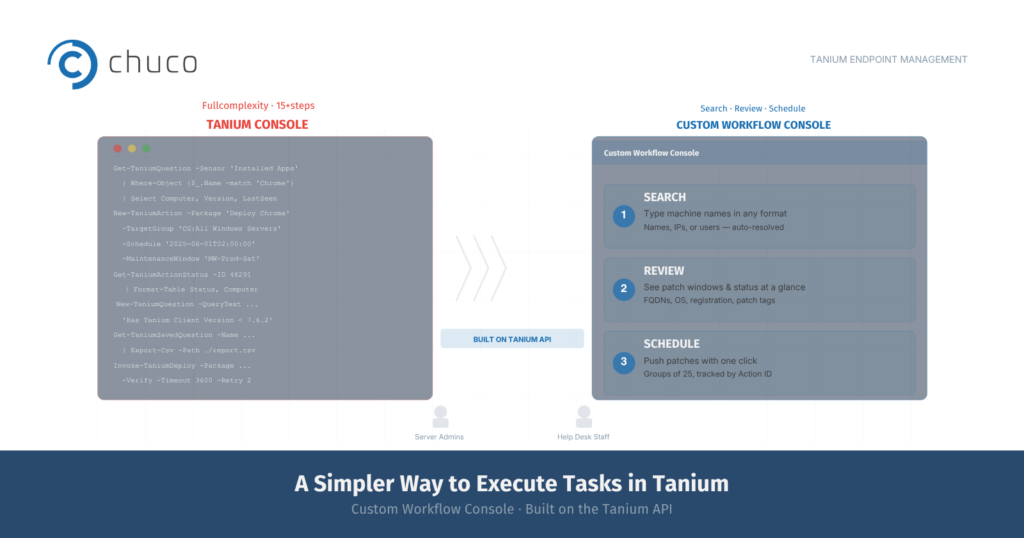
Some users want a faster way to execute specific tasks, without having to navigate the full Tanium Console. 

The first class of users, Windows administrators and Linux administrators, is highly technical. These users are often accustomed to getting most of their work done using a shell. With so many other day-to-day responsibilities, these admins often ask if they can access Tanium via a simpler interface in order to patch and secure their systems quickly and efficiently. 

Another class of users is help desk support staff. Depending on how IT support staff are organized, the Tier 1 and Tier 2 help desk may need to deploy software updates targeting specific machines using Tanium. In reality, they require only limited access and want to avoid deploying packages to the wrong machines or performing other actions by mistake. 

In order to get maximum benefit out of endpoint security management using Tanium, clients have asked us to develop a tool that enables these users to perform basic Tanium task execution without becoming a fully certified Tanium operator. 

The Custom Workflow Console for Tanium​

In response, we’ve developed a simple tool for basic users of Tanium, built on the Tanium API. The Custom Workflow Console is a web app that provides a straightforward way to run queries and schedule patches, and doesn’t require knowledge of how to use Tanium Question Builder. 

For experienced admins, it provides a much faster way to find servers and workstations with the attributes they are looking for, identify potential maintenance windows, and plan and schedule patches. 

For help desk staff, it provides a safer way to deploy patches targeting specific machines. They no longer have to worry about forgetting a step and accidentally deploying patches to a much larger number of computers than they had intended. 

Use Case #1 — Server Custodian Managing 40 Servers with Tanium

Here is an example of how the Custom Workflow Console simplifies Tanium task execution. Say you are the custodian of 40 servers out of thousands in your organization’s network. You’ll regularly check on the status of those servers: when are they scheduled to get patched; are they even ready to get patched; and whether there are any servers that did not get patched, or were only partially patched during the last scheduled update. 

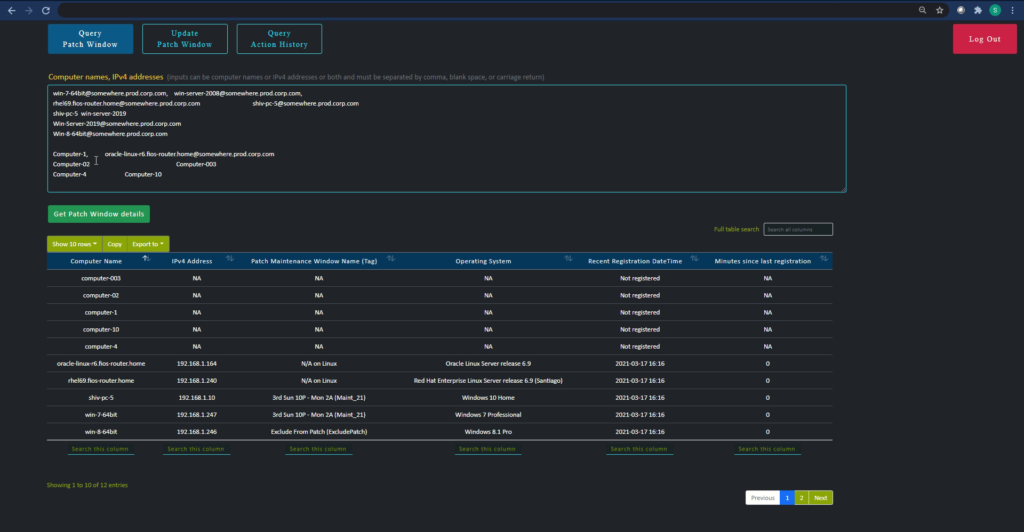
Using the Custom Workflow Console, your admins can type in machine names in any unstructured format to search for the specific servers they are looking for. They can also type in IP addresses, last logged-in user, or a combination of computer names, IP addresses, and last logged-in user. This saves time spent hunting for the “correct” server name and format in order to find them in the system. (The parser automatically runs reverse look-ups in the background, and also de-duplicates as needed.) 

The Query Patch Window page then automatically displays the FQDNs, the IP addresses, the patch window tags, operating systems, the registered time, and how many minutes have passed since the last registration for each server. 

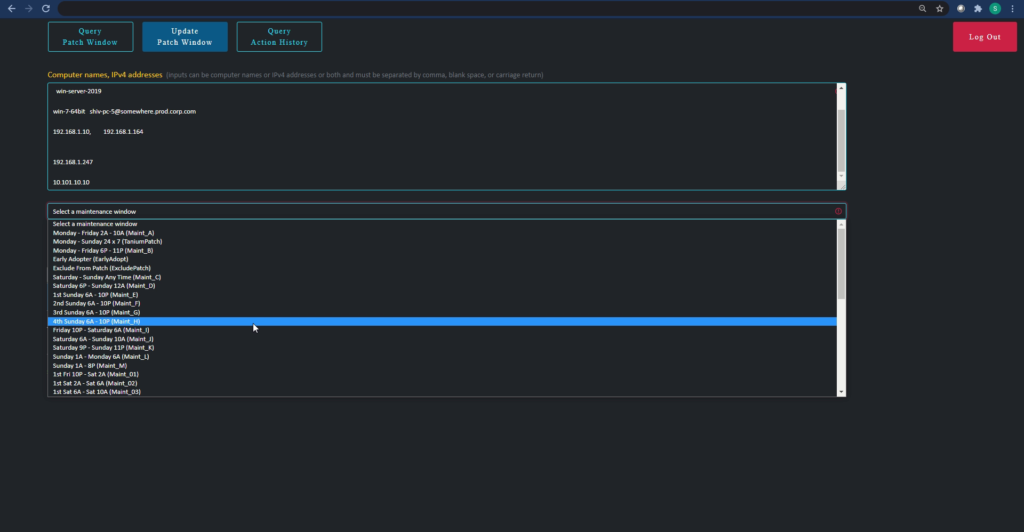
The Update Patch Window page allows you to schedule patches with the push of a button. Groups of up to 25 machines can be upgraded at once, and are assigned the same Action ID. Later, when you check on the status of your 40 servers, you can quickly run reports on the relevant Action IDs to find out if any additional follow-up is needed. 

Use Case #2 — Help Desk Staff Performing Targeted Tanium Task Execution

If you are a Tier 1 or Tier 2 help desk support specialist, you generally provide very focused support to end users. The Custom Workflow Console enables you to quickly find the status of the computers you are looking for, even without extensive training on the intricacies of Tanium Question Builder and all the additional functionality and access you don’t need.

The web app also provides safeguards to prevent you from accidentally patching more machines than you had intended. By reducing the time it takes to find the right workstations and streamlining the package deployment process, you’ll be faster in responding to help desk tickets and in contributing to your organization’s endpoint security. 

To Learn More​

The Custom Workflow Console for Tanium is just one tool we provide to simplify and automate endpoint management for our clients. At Chuco, we specialize in Tanium and offer our clients the flexibility to engage our team at the level of involvement and cost that suits their needs. 

For more information, including the Custom Workflow Console and the managed services options we offer to clients who prefer more hands-on support on an ongoing basis, contact us. 

Stay Ahead with the Tanium Insider Newsletter!

Other Resources that might interest you ​