Tanium Automation and AI: Two Layers That Reduce the Manual Work

There’s a version of Tanium that runs on manual effort. An administrator queries endpoints, reads the results, decides what to do, builds the action, deploys it, and checks whether it worked. It’s effective. It’s also slow, and it doesn’t scale when you’re managing thousands of endpoints across dozens of configurations. 

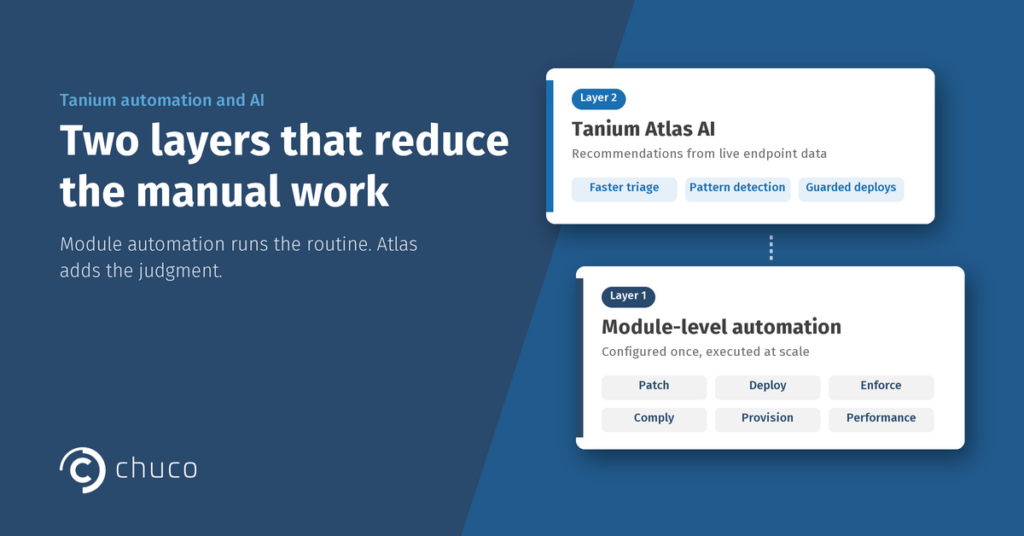
Tanium automation and AI work at two distinct layers, and understanding the difference matters. The first layer is module-level automation: rules, policies, and workflows that eliminate manual steps from routine operations. The second layer is Tanium Atlas, the AI capability that sits on top of the platform and turns live endpoint data into actionable recommendations. 

Both layers reduce manual work. They do it in fundamentally different ways. 

Layer 1: Module-Level Automation

This is the automation most teams encounter first. It’s built into the modules and doesn’t require AI. It requires configuration. 

Automated patching with Tanium Patch and Deploy. Patch cycles run on defined schedules. Maintenance windows are respected. Deployment plans follow ring-based rollouts. Post-patch restarts happen automatically. The team isn’t clicking “deploy” on every update. The system handles the mechanics based on rules the team configured once and refines over time. 

Automated policy enforcement with Tanium Enforce. Security configurations, firewall rules, registry settings, and encryption standards. Enforce doesn’t just check whether they’re in place. It puts them back when they drift. Instead of an admin manually remediating every configuration finding that Comply surfaces, Enforce maintains the desired state continuously. 

Automated vulnerability scanning with Tanium Comply. Scans run on cadence. Results feed into triage workflows. When a finding maps to an available patch or deploy, the remediation path can connect directly into patching operations without manual handoff. When it maps to a configuration change, Enforce can be configured to handle it. 

Automated endpoint provisioning with Tanium Provision. OS images deploy to bare metal or virtual machines from standardized templates. Every new endpoint starts from a known-good configuration. No more variations between what the image was supposed to look like and what actually shipped. 

Automated performance alerting with Tanium Performance. Alert thresholds trigger when CPU, memory, disk, or application health metrics cross defined boundaries. The team investigates and remediates through the same console instead of switching to a separate monitoring stack. 

The common thread across all of these: someone configures the automation once, and the platform handles the execution at scale. The manual version of each workflow still exists. Teams that haven’t configured the automation are doing it by hand, every time, across every endpoint. 

Layer 2: Tanium Atlas AI

Tanium Atlas adds something different. Instead of following rules a human configured, Atlas reads the live state of your environment and generates recommendations based on what it finds. 

Ask Atlas about your vulnerability posture. It doesn’t just repeat the Comply scan results. It correlates findings across modules, identifies patterns, and proposes concrete actions grouped by endpoint cohort. In some cases it recommends remediation paths that use tools your own team built internally, not just vendor defaults. 

We covered the implications of this in our Atlas and tool health post. The short version: Atlas can only be as good as the data it’s working with, and the ongoing grounding improvements Tanium is shipping with every release are steadily closing that gap. 

Where Atlas changes daily operations: 

  • Faster triage. Instead of an engineer manually reviewing scan results, prioritizing findings, and building remediation plans, Atlas can deliver a draft triage with recommended actions. The engineer reviews and approves rather than building from scratch. 
  • Surface patterns humans miss. Across a fleet of thousands, patterns emerge that are invisible when reviewing endpoint data individually. Atlas can identify that a specific group of endpoints all share the same tool health issue, or that a particular OS configuration is consistently producing the same compliance drift. Spotting these correlations manually would take hours. Atlas surfaces them in the conversation. 
  • Software deployment with guardrails. Atlas can now drive deployments through Tanium Deploy with built-in safety: ring-based or test deployments required by default before anything goes fleet-wide. This moves Atlas from advisory (“here’s what you should do”) to operational (“here’s the deployment, scoped safely, ready to execute”). 

The Relationship Between the Two Layers

Module-level automation handles the routine. It does the same thing, the same way, every time, at scale. Patch on schedule. Enforce the policy. Run the scan. Alert on the threshold. 

Atlas handles the judgment layer. What should we be looking at? Which findings matter most? Where is the environment drifting in ways the existing automation doesn’t cover? What would a senior engineer recommend if they could review the entire fleet at once? 

The two layers complement each other. Module automation without AI means consistent operations but limited adaptability. Everything runs as configured, even when the environment has changed in ways the configuration doesn’t account for. AI without module automation means good recommendations with no efficient way to act on them. Atlas can tell you what needs to happen. If the modules aren’t configured to execute, someone still has to do it manually. 

The most effective Tanium automation and AI implementations have both layers running: modules handling the routine execution, Atlas providing the intelligence layer that continuously evaluates whether the routine is still the right one. 

Why Automation and AI Still Require Operational Depth

Configuring module-level automation takes Tanium-specific expertise. Maintaining it takes dedicated bandwidth. Integrating Atlas effectively takes both, plus a clear understanding of where to trust it and where to verify. 

Most teams have the capacity to do some of this well. Doing all of it consistently, across every module, while keeping up with new releases and capabilities, is where bandwidth runs short. That’s the gap a Tanium specialist fills. 

Chuco helps organizations configure, tune, and operate both layers of Tanium automation and AI. From building the foundational module automations that eliminate manual work to integrating Atlas into daily operations as a trusted intelligence layer. 

Getting Started

Want to see how much of your Tanium automation potential you’re actually using? Schedule a Health Check. 45 minutes, no commitment. One of the most common findings is automation capability that’s licensed and available but sitting unused. 

Evaluating Tanium? Request a demo and see what both layers look like in practice. Visit our Licensing hub to explore Chuco Assist, Co-Manage, and Managed AEM. 

Stay Ahead with the Tanium Insider Newsletter!

Other Resources that might interest you ​